projgeom package
Submodules
projgeom.ck_plane module
Cayley-Klein Plane (ck_plane.py)
- This code defines a set of classes and functions for working with Cayley-Klein
planes, which are a type of geometric structure used in projective geometry. The purpose of this code is to provide tools for performing calculations and operations in Cayley-Klein geometry.
- The main input for this code is geometric objects like points and lines in a
Cayley-Klein plane. These are represented by the CayleyKleinPlane class and its subclasses PointCk and LineCk. The code doesn’t take direct user input, but rather provides a framework for working with these geometric objects programmatically.
- The outputs of this code are various geometric calculations and transformations.
For example, it can determine if two lines are perpendicular, calculate the altitude of a point with respect to a line, find the orthocenter of a triangle, or reflect a point across a mirror plane.
- The code achieves its purpose through a series of mathematical operations and
geometric algorithms. It uses abstract methods and type hinting to define the structure of Cayley-Klein planes and their properties. The actual calculations are performed in functions like is_perpendicular, altitude, orthocenter, and reflect.
Some important logic flows in this code include:
The use of the perp() method to find polar lines or poles of points, which are essential for various geometric constructions. Note: perp() represents the polar/pole operation in projective geometry, not perpendicular.
The calculation of altitudes using the meet() operation between lines and points.
The determination of the orthocenter by finding the intersection of two altitudes of a triangle.
The reflection of points using an involution operation.
- The code uses object-oriented programming concepts to represent geometric
entities and their relationships. It also employs type hinting and abstract methods to ensure proper usage of the classes and functions. While the actual mathematical operations are not fully implemented in this snippet, the code provides a clear structure for how these geometric calculations should be performed in a Cayley-Klein plane.
- class projgeom.ck_plane.CayleyKleinPlane[source]
Bases:
ProjectivePlane[Dual,Value],Generic[Dual,Value]The class CayleyKleinPlane represents a Cayley-Klein plane in projective geometry.
- projgeom.ck_plane.altitude(pt_p: CayleyKleinPlane[CayleyKleinPlane[CayleyKleinPlane[LineCk, int], int], int], ln_l: CayleyKleinPlane[CayleyKleinPlane[CayleyKleinPlane[PointCk, int], int], int]) CayleyKleinPlane[CayleyKleinPlane[CayleyKleinPlane[PointCk, int], int], int][source]
The altitude function calculates the altitude of a point pt_p with respect to a line ln_l in a Cayley-Klein geometry.
- Parameters:
pt_p (PointCk) – pt_p is a CayleyKleinPlanePrimitive object representing a point in three-dimensional space
ln_l (LineCk) – ln_l is a CayleyKleinPlanePrimitive object representing a line in a hyperbolic plane
- Returns:
The function altitude returns a CayleyKleinPlanePrimitive<Line> object.
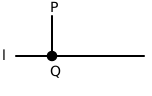
Examples
>>> from projgeom.hyp_object import HyperbolicLine, HyperbolicPoint
>>> t = altitude(HyperbolicPoint([0, 1, 0]), HyperbolicLine([0, 0, 1]))
>>> t == HyperbolicLine([1, 0, 0])
True
- projgeom.ck_plane.is_perpendicular(l_1: CayleyKleinPlane[CayleyKleinPlane[CayleyKleinPlane[PointCk, int], int], int], l_2: CayleyKleinPlane[CayleyKleinPlane[CayleyKleinPlane[PointCk, int], int], int]) bool[source]
The function is_perpendicular checks if two lines are perpendicular.
- Parameters:
l_1 (LineCk) – The parameter l_1 represents a line in Cayley-Klein geometry. It is of type LineCk, which is likely a custom class representing a hyperbolic line
l_2 (LineCk) – The parameter l_2 represents a line in Cayley-Klein geometry
- Returns:
a boolean value, indicating whether the two given lines are perpendicular to each other.
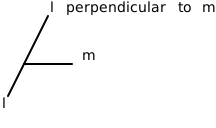
Examples
>>> from projgeom.hyp_object import HyperbolicLine, HyperbolicPoint
>>> is_perpendicular(HyperbolicLine([0, 1, 0]), HyperbolicLine([0, 0, 1]))
True
>>> is_perpendicular(HyperbolicLine([0, 1, 0]), HyperbolicLine([0, 0, -1]))
True
- projgeom.ck_plane.orthocenter(triangle: List[CayleyKleinPlane[CayleyKleinPlane[CayleyKleinPlane[LineCk, int], int], int]]) CayleyKleinPlane[CayleyKleinPlane[CayleyKleinPlane[LineCk, int], int], int][source]
The orthocenter function calculates the orthocenter of a triangle in Cayley-Klein geometry.
- Parameters:
triangle (List[PointCk]) – The triangle parameter is a list of three CayleyKleinPlanePrimitive<Point> objects.
- Returns:
The function orthocenter returns a CayleyKleinPlanePrimitive<Point> object.
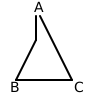
Examples
>>> from projgeom.hyp_object import HyperbolicLine, HyperbolicPoint
>>> t = orthocenter([HyperbolicPoint([0, 1, 0]), HyperbolicPoint([0, 0, 1]), HyperbolicPoint([1, 0, 0])])
>>> t == HyperbolicPoint([1, 1, 1])
True
- projgeom.ck_plane.reflect(mirror: CayleyKleinPlane[CayleyKleinPlane[CayleyKleinPlane[PointCk, int], int], int], pt_p: CayleyKleinPlane[CayleyKleinPlane[CayleyKleinPlane[LineCk, int], int], int]) CayleyKleinPlane[CayleyKleinPlane[CayleyKleinPlane[LineCk, int], int], int][source]
The reflect function performs a reflection of a plane pt_p across a mirror plane mirror.
- Parameters:
mirror (CayleyKleinPlane) – The mirror parameter is of type CayleyKleinPlane<Line>, which represents a mirror plane. It is used to define the mirror in which the point pt_p will be reflected
pt_p (CayleyKleinPlane) – The parameter pt_p represents a CayleyKleinPlane object
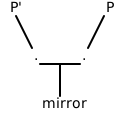
Examples
>>> from projgeom.hyp_object import HyperbolicLine, HyperbolicPoint
>>> t = reflect(HyperbolicLine([0, 1, 0]), HyperbolicPoint([0, 0, 1]))
>>> t == HyperbolicPoint([0, 1, 0])
False
- projgeom.ck_plane.tri_altitude(triangle: List[CayleyKleinPlane[CayleyKleinPlane[CayleyKleinPlane[LineCk, int], int], int]]) List[CayleyKleinPlane[CayleyKleinPlane[CayleyKleinPlane[PointCk, int], int], int]][source]
The function tri_altitude calculates the altitudes of a triangle.
- Parameters:
triangle – The triangle parameter is a list containing three elements. Each element represents a side of a triangle
- Returns:
a list of altitudes of a triangle.
Examples
>>> from projgeom.hyp_object import HyperbolicLine, HyperbolicPoint
>>> triangle = [HyperbolicPoint([0, 1, 0]), HyperbolicPoint([0, 0, 1]), HyperbolicPoint([1, 0, 0])]
>>> altitudes = tri_altitude(triangle)
>>> len(altitudes)
3
projgeom.ell_object module
- class projgeom.ell_object.EllipticLine(coord: List[int])[source]
Bases:
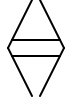
PgObject[EllipticPoint]The EllipticLine class represents a line in Elliptic geometry and has a method perp() that returns the pole.
- dual_type() type[source]
Returns the type of the dual object (EllipticPoint for EllipticLine).
- Returns:
The type of the dual geometric object.
Examples
>>> from projgeom.ell_object import EllipticLine
>>> ln = EllipticLine([1, 2, 3])
>>> ln.dual_type()
<class 'projgeom.ell_object.EllipticPoint'>
- perp() EllipticPoint[source]
The perp function returns an EllipticPoint object, which represents the pole of this line. Note: This represents the pole operation in projective geometry, not perpendicular. :return: An EllipticPoint object is being returned.
Examples
>>> from projgeom.ell_object import EllipticPoint, EllipticLine
>>> l = EllipticLine([1, 2, 3])
>>> l.perp()
EllipticPoint(1 : 2 : 3)
- pole() EllipticPoint[source]
The pole function returns an EllipticPoint object, which represents the pole of this line. :return: An EllipticPoint object is being returned.
Examples
>>> from projgeom.ell_object import EllipticPoint, EllipticLine
>>> l = EllipticLine([1, 2, 3])
>>> l.pole()
EllipticPoint(1 : 2 : 3)
- class projgeom.ell_object.EllipticPoint(coord: List[int])[source]
Bases:
PgObject[EllipticLine]
- dual_type() type[source]
Returns the type of the dual object (EllipticLine for EllipticPoint).
- Returns:
The type of the dual geometric object.
Examples
>>> from projgeom.ell_object import EllipticPoint
>>> pt = EllipticPoint([1, 2, 3])
>>> pt.dual_type()
<class 'projgeom.ell_object.EllipticLine'>
- perp() EllipticLine[source]
The perp function returns an EllipticLine object representing the polar line of this point. Note: This represents the polar operation in projective geometry, not perpendicular. :return: The perp method is returning an instance of the EllipticLine class.
Examples
>>> from projgeom.ell_object import EllipticPoint, EllipticLine
>>> p = EllipticPoint([1, 2, 3])
>>> p.perp()
EllipticLine(1 : 2 : 3)
- polar() EllipticLine[source]
The polar function returns an EllipticLine object representing the polar line of this point. :return: The polar method is returning an instance of the EllipticLine class.
Examples
>>> from projgeom.ell_object import EllipticPoint, EllipticLine
>>> p = EllipticPoint([1, 2, 3])
>>> p.polar()
EllipticLine(1 : 2 : 3)
projgeom.hyp_object module
- class projgeom.hyp_object.HyperbolicLine(coord: List[int])[source]
Bases:
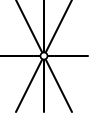
PgObject[HyperbolicPoint]The HyperbolicLine class represents a line in Hyperbolic geometry and provides methods for finding its pole.
- dual_type() type[source]
Returns the type of the dual object (HyperbolicPoint for HyperbolicLine).
- Returns:
The type of the dual geometric object.
Examples
>>> from projgeom.hyp_object import HyperbolicLine
>>> ln = HyperbolicLine([1, 2, 3])
>>> ln.dual_type()
<class 'projgeom.hyp_object.HyperbolicPoint'>
- perp() HyperbolicPoint[source]
The perp function returns a HyperbolicPoint object that represents the pole to the given line. Note: This represents the pole operation in projective geometry, not perpendicular. :return: The perp method returns a HyperbolicPoint object.
Examples
>>> from projgeom.hyp_object import HyperbolicPoint, HyperbolicLine
>>> l = HyperbolicLine([1, 2, 3])
>>> l.perp()
HyperbolicPoint(1 : 2 : -3)
- pole() HyperbolicPoint[source]
The pole function returns a HyperbolicPoint object that represents the pole to the given line. :return: The pole method returns a HyperbolicPoint object.
Examples
>>> from projgeom.hyp_object import HyperbolicPoint, HyperbolicLine
>>> l = HyperbolicLine([1, 2, 3])
>>> l.pole()
HyperbolicPoint(1 : 2 : -3)
- class projgeom.hyp_object.HyperbolicPoint(coord: List[int])[source]
Bases:
PgObject[HyperbolicLine]
- dual_type() type[source]
Returns the type of the dual object (HyperbolicLine for HyperbolicPoint).
- Returns:
The type of the dual geometric object.
Examples
>>> from projgeom.hyp_object import HyperbolicPoint
>>> pt = HyperbolicPoint([1, 2, 3])
>>> pt.dual_type()
<class 'projgeom.hyp_object.HyperbolicLine'>
- perp() HyperbolicLine[source]
Polar line of the point.
Note: This represents the polar operation in projective geometry, not perpendicular.
- Returns:
a HyperbolicLine object.
Examples
>>> from projgeom.hyp_object import HyperbolicPoint, HyperbolicLine
>>> p = HyperbolicPoint([1, 2, 3])
>>> p.perp()
HyperbolicLine(1 : 2 : -3)
- polar() HyperbolicLine[source]
Polar line of the point.
- Returns:
a HyperbolicLine object.
Examples
>>> from projgeom.hyp_object import HyperbolicPoint, HyperbolicLine
>>> p = HyperbolicPoint([1, 2, 3])
>>> p.polar()
HyperbolicLine(1 : 2 : -3)
projgeom.myck_object module
MyCKPoint and MyCKLine Classes
This code defines two classes, MyCKPoint and MyCKLine, which are used to represent points and lines in Cayley-Klein geometry, a type of projective geometry. These classes are designed to work together and provide methods for geometric operations.
- The purpose of this code is to create a framework for working with points and
lines in Cayley-Klein geometry. It allows users to create point and line objects and perform operations on them, such as finding the polar line to a point, or the pole of a line.
Both classes inherit from a PgObject class, which likely provides some common functionality for projective geometry objects. The classes don’t explicitly take any inputs when created, but they are designed to work with coordinate data, which is assumed to be stored in a ‘coord’ attribute.
- The perp() method in each class produces a new object of the opposite type - a
MyCKLine for a point, or a MyCKPoint for a line.
The code achieves its purpose by implementing two key methods for each class:
dual(): This method returns the type of the dual object. For a point, the dual is a line, and vice versa.
perp(): This method calculates the polar object. For a point, it calculates the polar line, and for a line, it calculates the pole point.
- The perp() methods contain the core logic of the classes. They perform
coordinate transformations to convert between points and lines. For MyCKPoint, the polar line is calculated by doubling the first and third coordinates and negating the first and third. For MyCKLine, the pole point is calculated by doubling the second coordinate and negating the first and third.
- These transformations represent important geometric relationships in
Cayley-Klein geometry. They allow users to easily switch between dual representations of geometric objects, which is a fundamental concept in projective geometry.
Overall, this code provides a simple but powerful tool for working with Cayley-Klein geometry, allowing users to create and manipulate geometric objects with ease.
- class projgeom.myck_object.MyCKLine(coord: List[int])[source]
-
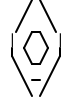
A customized line class for Cayley-Klein geometry.
- dual_type() type[source]
Returns the type of the dual object (MyCKPoint for MyCKLine).
- Returns:
The type of the dual geometric object.
Examples
>>> from projgeom.myck_object import MyCKLine
>>> ln = MyCKLine([1, 2, 3])
>>> ln.dual_type()
<class 'projgeom.myck_object.MyCKPoint'>
- perp() MyCKPoint[source]
Pole of the line. Note: This represents the pole operation in projective geometry, not perpendicular. :return: The perp method returns a MyCKPoint object.
Examples
>>> from projgeom.myck_object import MyCKPoint, MyCKLine
>>> l = MyCKLine([1, 2, 3])
>>> l.perp()
MyCKPoint(-1 : 4 : -3)
- class projgeom.myck_object.MyCKPoint(coord: List[int])[source]
-
A customized point class for Cayley-Klein geometry.
- dual_type() type[source]
Returns the type of the dual object (MyCKLine for MyCKPoint).
- Returns:
The type of the dual geometric object.
Examples
>>> from projgeom.myck_object import MyCKPoint
>>> pt = MyCKPoint([1, 2, 3])
>>> pt.dual_type()
<class 'projgeom.myck_object.MyCKLine'>
- perp() MyCKLine[source]
The perp function returns an instance of the MyCKLine class that represents a polar line. Note: This represents the polar operation in projective geometry, not perpendicular. :return: an instance of the MyCKLine class.
Examples
>>> from projgeom.myck_object import MyCKPoint, MyCKLine
>>> p = MyCKPoint([1, 2, 3])
>>> p.perp()
MyCKLine(-2 : 2 : -6)
projgeom.persp_object module
- class projgeom.persp_object.PerspLine(coord: List[int])[source]
Bases:
PgObject[PerspPoint]A line in a perspective plane.
The PerspLine class represents a line in a perspective plane and provides methods for calculating the pole, as well as checking if two lines are parallel.
- dual_type() type[source]
Returns the type of the dual object (PerspPoint for PerspLine).
- Returns:
The type of the dual geometric object.
Examples
>>> from projgeom.persp_object import PerspLine
>>> ln = PerspLine([1, 2, 3])
>>> ln.dual_type()
<class 'projgeom.persp_object.PerspPoint'>
- is_parallel(other: PerspLine) bool[source]
The function checks if two lines are parallel by calculating the dot product of their direction vectors.
- Parameters:
other ("PerspLine") – The “other” parameter is an object of the same class as the current object. It represents another instance of the class that we want to check for parallelism with the current object
- Returns:
a boolean value, indicating whether the two objects are parallel or not.
Examples
>>> from projgeom.persp_object import PerspLine
>>> l1 = PerspLine([1, 2, 3])
>>> l2 = PerspLine([1, 2, 4])
>>> l1.is_parallel(l2)
False
- perp() PerspPoint[source]
Pole of the line.
Returns the pole (dual point) for any line in a perspective plane. Note: This represents the pole operation in projective geometry, not perpendicular.
- Returns:
The PerspPoint representing the pole.
Examples
>>> from projgeom.persp_object import PerspLine
>>> l = PerspLine([1, 2, 3])
>>> l.perp()
PerspPoint(1 : 5 : 5)
- pole() PerspPoint[source]
Pole
The pole function returns a PerspPoint object that is obtained by taking the dot product of self with I_RE and I_IM, and then using the results to create a new PerspPoint object using the parametrize method of I_RE. Note: This represents the pole operation in projective geometry, not perpendicular. :return: a PerspPoint object.
- class projgeom.persp_object.PerspPoint(coord: List[int])[source]
-
A point in a perspective plane.
The PerspPoint class represents a point in a perspective plane and provides methods for calculating the polar line, and midpoint of the point.
- dual_type() type[source]
Returns the type of the dual object (PerspLine for PerspPoint).
- Returns:
The type of the dual geometric object.
Examples
>>> from projgeom.persp_object import PerspPoint
>>> pt = PerspPoint([1, 2, 3])
>>> pt.dual_type()
<class 'projgeom.persp_object.PerspLine'>
- midpoint(other: PerspPoint) PerspPoint[source]
The midpoint function calculates the midpoint between two PerspPoint objects.
- Parameters:
other ("PerspPoint") – The other parameter is an instance of the same class as self. It represents another point that you want to find the midpoint with
- Returns:
The midpoint method returns an instance of the PerspPoint class.
Examples
>>> from projgeom.persp_object import PerspPoint
>>> p1 = PerspPoint([1, 2, 3])
>>> p2 = PerspPoint([4, 5, 6])
>>> p1.midpoint(p2)
PerspPoint(5 : 7 : 9)
- perp() PerspLine[source]
Polar line.
Returns the line at infinity as the polar for any point in a perspective plane. Note: This represents the polar operation in projective geometry, not perpendicular.
- Returns:
The PerspLine representing the line at infinity.
Examples
>>> from projgeom.persp_object import PerspPoint
>>> p = PerspPoint([1, 2, 3])
>>> p.perp()
PerspLine(0 : -1 : 1)
- polar() PerspLine[source]
Polar line.
Returns the line at infinity as the polar for any point in a perspective plane. Note: This represents the polar operation in projective geometry, not perpendicular.
- Returns:
The PerspLine representing the line at infinity.
Examples
>>> from projgeom.persp_object import PerspPoint
>>> p = PerspPoint([1, 2, 3])
>>> p.polar()
PerspLine(0 : -1 : 1)
projgeom.pg_object module
PgObject.py
- This code defines a set of classes and functions for working with projective
geometry objects in a 2D plane. The main purpose is to represent and manipulate points and lines in projective space, which is a way of thinking about geometry that includes points at infinity.
The code takes inputs in the form of coordinates, typically represented as lists of three integers. These coordinates define the position of points or the equation of lines in the projective plane. The outputs are various geometric objects (points and lines) and the results of operations performed on them, such as checking if a point lies on a line or finding the intersection of two lines.
- The main class, PgObject, serves as a base for both points (PgPoint) and
lines (PgLine). It provides common functionality like equality checking, string representation, and basic geometric operations. The PgPoint and PgLine classes are specialized versions of PgObject that represent points and lines respectively.
The code achieves its purpose through several key functions:
dot: Calculates the dot product of two vectors, which is used to check if points lie on lines.
cross: Computes the cross product of two vectors, used to find intersections of lines.
plckr: Performs a linear combination of two vectors, useful for parametrizing points and lines.
- The main logic flow involves creating PgPoint and PgLine objects, then
using their methods to perform geometric operations. For example, you can check if a point is incident to a line, find the intersection of two lines, or create a line passing through two points.
- An important concept in this code is duality, where points and lines can be interchanged.
This is represented by the ‘aux’ method, which returns the dual object (a line for a point, or a point for a line).
- The code uses abstract methods and type hinting to ensure proper implementation
and usage of the geometric objects. It also includes docstrings and examples to help users understand how to use the classes and functions.
- Overall, this code provides a foundation for working with projective geometry,
allowing users to create and manipulate geometric objects in a way that’s consistent with the mathematical principles of projective spaces.
- class projgeom.pg_object.PgLine(coord: List[int])[source]
-
Projective Geometry Line
The PgLine class represents a projective geometry line and has a method dual() that returns the dual object, which is a PgPoint.
Examples
>>> from projgeom.pg_object import PgPoint, PgLine
>>> ln_l = PgLine([1, 2, 3])
>>> pt_p = ln_l.aux()
>>> assert isinstance(pt_p, PgPoint)
>>> assert not ln_l.incident(pt_p)
- class projgeom.pg_object.PgObject(coord: List[int])[source]
Bases:
ProjectivePlane[Dual,int]The PgObject class represents a geometric object in a projective plane with integer coordinates.
- Parameters:
coord (List[int]) – The coord parameter represents a list of three integers that represent the coordinates of the geometric object.
- Raises:
ValueError – The coord parameter must be a list of three integers.
Examples
>>> pt_p = PgObject([3, 4, 5])
>>> pt_p.coord
[3, 4, 5]
- aux() Dual[source]
The aux function returns a Dual object with a copy of the coord attribute. :return: The aux function is returning a Dual object.
- dot(line: Dual) int[source]
The dot function calculates the dot product between two vectors.
- Parameters:
line – The line parameter is of type PgLine
- Returns:
The dot method is returning an integer value.
Examples
>>> pt_p = PgObject([3, 4, 5])
>>> ln_l = PgObject([30, 40, 50])
>>> pt_p.dot(ln_l)
500
- dual_type() Type[Dual][source]
The dual function returns the type PgLine. :return: The dual method is returning the type PgLine.
- incident(rhs: Dual) bool[source]
The function checks if two objects have a zero dot product.
- Parameters:
rhs (Dual) – The parameter rhs is of type Dual and represents the right-hand side of the equation
- Returns:
a boolean value.
Examples
>>> pt_p = PgObject([1, 2, 3])
>>> ln_l = PgObject([4, 5, 6])
>>> pt_p.incident(ln_l)
False
- meet(rhs: Self) Dual[source]
The meet function performs a join or meet operation on two PgObject objects and returns a Dual object.
- Parameters:
rhs ("PgObject[Dual]") – The parameter rhs stands for “right-hand side” and it represents another PgObject object that is being passed as an argument to the meet method
- Returns:
a Dual object.
Examples
>>> from projgeom.pg_object import PgPoint, PgLine
>>> p1 = PgPoint([1, 2, 3])
>>> p2 = PgPoint([4, 5, 6])
>>> p1.meet(p2)
PgLine(-3 : 6 : -3)
- parametrize(lambda_: Value, pt_q: Self, mu_: Value) Self[source]
Homogeneous parametrization of point or line
- Parameters:
lambda (int) – The parameter lambda_ represents the index of the coordinate to be used in the parametrize operation
pt_q ("PgObject[Dual]") – The parameter pt_q is an instance of the PgObject class
mu (int) – The parameter mu_ is an integer that represents the scalar multiplier for the pt_q object in the parametrize operation
- Returns:
The parametrize method returns an instance of the PgObject class.
Examples
>>> pt_p = PgObject([1, 2, 3])
>>> pt_q = PgObject([4, 5, 6])
>>> pt_p.parametrize(1, pt_q, 2) == PgObject([9, 12, 15])
True
- class projgeom.pg_object.PgPoint(coord: List[int])[source]
-
Projective Geometry Point
The PgPoint class represents a point in projective geometry and has a method dual() that returns the dual line of the point.
- projgeom.pg_object.cross(vec_a: List[int], vec_b: List[int]) List[int][source]
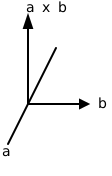
The cross function calculates the cross product of two vectors.
- Parameters:
- Returns:
The function cross returns a list of three integers.
Examples
>>> cross([1, 2, 3], [4, 5, 6])
[-3, 6, -3]
>>> cross([1, 2, 3], [4, 5, 6]) == [-3, 6, -3]
True
- projgeom.pg_object.dot(vec_a: List[int], vec_b: List[int]) int[source]
The dot function calculates the dot product of two lists of integers.
- Parameters:
- Returns:
The function dot returns the dot product of two lists of integers.

Examples
>>> dot([1, 2, 3], [4, 5, 6])
32
>>> dot([1, 2, 3], [4, 5, 6]) == 32
True
- projgeom.pg_object.plckr(lambda_: int, vec_a: List[int], mu_: int, vec_b: List[int]) List[int][source]
Homogeneous parametrization of point or line
- Parameters:
lambda_ – lambda_ is an integer representing the scalar coefficient for the first vector vec_a in the Plucker operation
vec_a (List[int]) – The parameter vec_a is a list of three integers
mu_ – The mu_ parameter represents a scalar value that is used in the Plucker operation
vec_b (List[int]) – The parameter vec_b is a list of integers
- Returns:
The plckr function returns a list of three integers.
Examples
>>> plckr(1, [1, 2, 3], 2, [4, 5, 6])
[9, 12, 15]
>>> plckr(1, [1, 2, 3], 2, [4, 5, 6]) == [9, 12, 15]
True
projgeom.pg_plane module
ProjectivePlane Class and Projective Geometry Functions
- This code defines a ProjectivePlane class and several functions related to
projective geometry. The purpose of this code is to provide a framework for working with points and lines in a projective plane, which is a concept in mathematics.
- The ProjectivePlane class is an abstract base class that defines the basic
operations and properties of objects in a projective plane. It doesn’t take any direct inputs or produce outputs on its own, but it sets up the structure for other classes to inherit from and implement these operations.
The class defines several abstract methods that need to be implemented by any concrete subclass:
dual(): Returns the dual of the object (e.g., the dual of a point is a line, and vice versa)
meet(): Finds the intersection of two objects
aux(): Returns a dual object not incident with the current object
dot(): Performs a basic measurement operation
parametrize(): Creates a new object on the line through two given points
incident(): Checks if two objects are incident (i.e., if a point lies on a line)
The code also defines several standalone functions that work with ProjectivePlane objects:
check_axiom(): Verifies basic properties of projective geometry, such as the commutativity of equality and incidence.
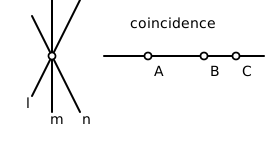
coincident(): Checks if three points are collinear (lie on the same line).
check_pappus(): Implements Pappus’s hexagon theorem, which is a fundamental theorem in projective geometry.
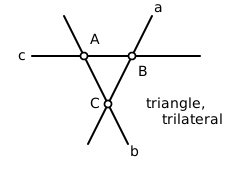
tri_dual(): Computes the dual of a triangle (the lines formed by its sides).
persp(): Checks if two triangles are in perspective (their corresponding sides intersect at collinear points).
check_desargue(): Implements Desargues’s theorem, another important result in projective geometry.
harm_conj(): Calculates the harmonic conjugate of three collinear points.
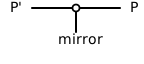
involution(): Performs an involution transformation on a point with respect to an origin and a mirror line.
These functions take various combinations of Point and Line objects (which are type aliases for ProjectivePlane) as inputs and typically return boolean values or new Point/Line objects as outputs.
- The code achieves its purpose by providing a structured way to represent and
manipulate geometric objects in a projective plane. It uses abstract methods to define the interface for working with these objects, and then implements higher-level geometric operations using these basic methods. The logic flows from simple operations like checking if points are incident with lines, to more complex geometric constructions and theorems.
- This code serves as a foundation for implementing and exploring projective
geometry concepts in a programming environment. It allows users to create geometric objects, perform basic operations on them, and verify important theorems in projective geometry.
- class projgeom.pg_plane.ProjectivePlane[source]
Bases:
Generic[Dual,Value]The ProjectivePlane trait defines the behavior of points and lines in a projective plane. It requires two associated types: Dual, which represents the dual object (line or point) in the projective plane, and Self, which represents the object implementing the trait.
- projgeom.pg_plane.check_axiom(pt_p: ProjectivePlane[ProjectivePlane[ProjectivePlane[Line, int], int], int], pt_q: ProjectivePlane[ProjectivePlane[ProjectivePlane[Line, int], int], int], ln_l: ProjectivePlane[ProjectivePlane[ProjectivePlane[Point, int], int], int]) None[source]
The function check_axiom checks various axioms related to a projective plane.
- Parameters:
pt_p (Point) – pt_p is a ProjectivePlanePrimitive object, which represents a point in a projective plane
pt_q (Point) – The parameter pt_q is a ProjectivePlanePrimitive object, which represents a point or a line in a projective plane
ln_l (Line) – The ln_l parameter represents a projective plane line
- projgeom.pg_plane.check_axiom2(pt_p: ProjectivePlane[ProjectivePlane[ProjectivePlane[Line, int], int], int], pt_q: ProjectivePlane[ProjectivePlane[ProjectivePlane[Line, int], int], int], ln_l: ProjectivePlane[ProjectivePlane[ProjectivePlane[Point, int], int], int], alpha: Value, beta: Value) None[source]
The function check_axiom2 checks various axioms related to a projective plane.
- Parameters:
pt_p (Point) – pt_p is a ProjectivePlanePrimitive object, which represents a point in a projective plane
pt_q (Point) – The parameter pt_q is a ProjectivePlanePrimitive object, which represents a point or a line in a projective plane
line (Line) – The line parameter represents a projective plane line
alpha (Value) – The parameter alpha is a value of type Value, which represents an element in the projective plane’s underlying field
beta (Value) – The parameter beta is a value of type Value, which represents an element in the projective plane’s underlying field
Examples
>>> from projgeom.pg_object import PgPoint, PgLine
>>> pt_p = PgPoint([1, 2, 3])
>>> pt_q = PgPoint([4, 5, 6])
>>> ln_l = PgLine([7, 8, 9])
>>> check_axiom2(pt_p, pt_q, ln_l, 1, 2)
- projgeom.pg_plane.check_desargue(tri_1: List[ProjectivePlane[ProjectivePlane[ProjectivePlane[Line, int], int], int]], tri_2: List[ProjectivePlane[ProjectivePlane[ProjectivePlane[Line, int], int], int]]) bool[source]
The function check_desargue checks if two triangles in a projective plane satisfy the Desargue’s theorem.
- Parameters:
tri_1 (List[Point]) – tri_1 is a list of ProjectivePlanePrimitive objects representing the first triangle in the Desargue’s theorem
tri_2 (List[Point]) – The tri_2 parameter is a list of ProjectivePlanePrimitive objects representing the second triangle
- Returns:
a boolean value.
Examples
>>> from projgeom.pg_object import PgLine, PgPoint
>>> tri_1 = [PgPoint([0, 1, 0]), PgPoint([0, 0, 1]), PgPoint([1, 0, 0])]
>>> tri_2 = [PgPoint([0, 0, 1]), PgPoint([0, 1, 0]), PgPoint([1, 0, 0])]
>>> check_desargue(tri_1, tri_2)
True
- projgeom.pg_plane.check_pappus(coline1: List[ProjectivePlane[ProjectivePlane[ProjectivePlane[Line, int], int], int]], coline2: List[ProjectivePlane[ProjectivePlane[ProjectivePlane[Line, int], int], int]]) bool[source]
The function check_pappus checks if three lines in a projective plane satisfy Pappus’ theorem.
- Parameters:
coline1 (List[Point]) – The parameter coline1 is a list of ProjectivePlanePrimitive objects
coline2 (List[Point]) – The parameter coline2 is a list of ProjectivePlanePrimitive objects
- Returns:
a boolean value.
Examples
>>> from projgeom.pg_object import PgLine, PgPoint
>>> coline1 = [PgPoint([0, 1, 0]), PgPoint([0, 0, 1]), PgPoint([1, 0, 0])]
>>> coline2 = [PgPoint([0, 0, 1]), PgPoint([0, 1, 0]), PgPoint([1, 0, 0])]
>>> check_pappus(coline1, coline2)
True
- projgeom.pg_plane.coincident(pt_p: ProjectivePlane[ProjectivePlane[ProjectivePlane[Line, int], int], int], pt_q: ProjectivePlane[ProjectivePlane[ProjectivePlane[Line, int], int], int], pt_r: ProjectivePlane[ProjectivePlane[ProjectivePlane[Line, int], int], int]) bool[source]
The coincident function checks if three points pt_p, pt_q, and pt_r are collinear in a projective plane.
- Parameters:
pt_p (Point) – pt_p is an object of type ProjectivePlanePrimitive<Point>. It represents a point in a projective plane
pt_q (Point) – pt_q is a ProjectivePlanePrimitive object, which represents a point in a projective plane
pt_r (Point) – The parameter pt_r represents a point in a projective plane
- Returns:
The function coincident returns a boolean value.
Examples
>>> from projgeom.pg_object import PgLine, PgPoint
>>> coincident(PgPoint([0, 1, 0]), PgPoint([0, 0, 1]), PgPoint([1, 0, 0]))
False
- projgeom.pg_plane.harm_conj(pt_a: ProjectivePlane[ProjectivePlane[ProjectivePlane[Line, int], int], int], pt_b: ProjectivePlane[ProjectivePlane[ProjectivePlane[Line, int], int], int], pt_c: ProjectivePlane[ProjectivePlane[ProjectivePlane[Line, int], int], int]) ProjectivePlane[ProjectivePlane[ProjectivePlane[Line, int], int], int][source]
The harm_conj function calculates the harmonic conjugate of three points on a projective plane.
- Parameters:
pt_a (Point) – a is an object of type ProjectivePlane
pt_b (Point) – The parameter pt_b represents a point on the projective plane
pt_c (Point) – The parameter pt_c represents a point on the projective plane
- Returns:
The function harm_conj returns a ProjectivePlane object.

Examples
>>> from projgeom.pg_object import PgPoint
>>> pt_a = PgPoint([1, 0, 0])
>>> pt_b = PgPoint([0, 1, 0])
>>> pt_c = PgPoint([1, 1, 0])
>>> pt_d = harm_conj(pt_a, pt_b, pt_c)
>>> harm_conj(pt_a, pt_b, pt_d) == pt_c
True
- projgeom.pg_plane.involution(origin: ProjectivePlane[ProjectivePlane[ProjectivePlane[Line, int], int], int], mirror: Any, pt_p: ProjectivePlane[ProjectivePlane[ProjectivePlane[Line, int], int], int]) ProjectivePlane[ProjectivePlane[ProjectivePlane[Line, int], int], int][source]
The function involution performs an involution transformation on a point pt_p with respect to an origin point origin and a mirror line mirror.
- Parameters:
origin (Point) – The origin parameter represents a point in a projective plane
mirror (Point) – The mirror parameter represents a mirror line or mirror plane in a projective plane. It is used to perform a reflection or mirror transformation on a point pt_p with respect to the mirror line or plane
pt_p (Point) – The parameter pt_p represents a point in a projective plane
- Returns:
a ProjectivePlane<Point> object.
Examples
>>> from projgeom.pg_object import PgPoint, PgLine
>>> origin = PgPoint([0, 0, 1])
>>> mirror = PgLine([0, 1, 0])
>>> pt_p = PgPoint([1, 2, 1])
>>> pt_q = involution(origin, mirror, pt_p)
>>> involution(origin, mirror, pt_q) == pt_p
True
- projgeom.pg_plane.persp(tri_1: List[ProjectivePlane[ProjectivePlane[ProjectivePlane[Line, int], int], int]], tri_2: List[ProjectivePlane[ProjectivePlane[ProjectivePlane[Line, int], int], int]]) bool[source]
The persp function checks whether two triangles are perspective.
- Parameters:
tri_1 (List[Point]) – tri_1 is a list of three ProjectivePlanePrimitive objects representing the vertices of the first triangle
tri_2 (List[Point]) – tri_2 is a list of three ProjectivePlanePrimitive objects representing the vertices of the second triangle
- Returns:
a boolean value.
Examples
>>> from projgeom.pg_object import PgLine, PgPoint
>>> tri_1 = [PgPoint([0, 1, 0]), PgPoint([0, 0, 1]), PgPoint([1, 0, 0])]
>>> tri_2 = [PgPoint([0, 0, 1]), PgPoint([0, 1, 0]), PgPoint([1, 0, 0])]
>>> persp(tri_1, tri_2)
True
- projgeom.pg_plane.tri_dual(triangle: List[ProjectivePlane[ProjectivePlane[ProjectivePlane[Line, int], int], int]]) List[ProjectivePlane[ProjectivePlane[ProjectivePlane[Point, int], int], int]][source]
The function tri_dual takes a list of three ProjectivePlanePrimitive objects representing a triangle and returns a list of three ProjectivePlanePrimitive objects representing the circumcircles of the triangle’s three edges.
- Parameters:
triangle (List[Point]) – The triangle parameter is expected to be a list of three elements. Each element should be an object of type ProjectivePlanePrimitive
- Returns:
The function tri_dual returns a list of three ProjectivePlanePrimitive objects.
Examples
>>> from projgeom.pg_object import PgPoint, PgLine
>>> tri_1 = [PgPoint([1, 0, 0]), PgPoint([0, 1, 0]), PgPoint([0, 0, 1])]
>>> dual_1 = tri_dual(tri_1)
>>> isinstance(dual_1[0], PgLine)
True